Scope change in 60 seconds
- Scope change: a decision to add, remove or alter work after a plan has been agreed. It is normal in agile delivery.
- Scope creep: "continuous or uncontrolled growth in a project's scope, generally experienced after the project begins."[1]
- The difference: a scope change is visible and decided. Scope creep is unrecorded and drifts in.
- Agile rule: time and capacity are fixed and scope flexes, but every change is deliberate and traced to a baseline.
- In SAFe: measure added, removed and moved work against the end-of-PI-Planning baseline, and protect committed PI objectives.
1. What is a scope change?
A scope change is any agreed addition, removal or modification of planned work. In agile terms, it means features or stories added, removed or moved within a sprint or Planning Interval after planning ended. Scope changes are expected; what matters is that each one is visible and decided on purpose.
Scope is the work you agreed to deliver: a scope statement in a traditional project, the Sprint Backlog in Scrum, and the features and PI objectives committed in PI Planning in SAFe.
Agile methods were built to accept change: "Welcome changing requirements, even late in development."[2] That is not the same as accepting every request without looking at the cost.
2. Scope change vs scope creep
A scope change is a deliberate, recorded decision with a known impact on time, capacity or other work. Scope creep is the gradual, uncontrolled growth of scope that nobody explicitly approved. The same story can be either, depending on whether it was assessed and recorded.
| Scope change | Scope creep | |
|---|---|---|
| How it happens | A request is raised, assessed and approved | Small additions slip in without a decision |
| Visibility | Recorded against the baseline | Often discovered only at the end |
| Trade-off | Something else moves, or capacity is confirmed | Nothing else moves, so the plan overflows |
| Effect | Plan stays credible | Missed dates and lower predictability |
Scope creep is also called requirement creep or feature creep.[1] Its harms include "overruns in costs, schedule, or both", though the same source notes that if it "is well managed, it can help projects by creating a better final product."[1] The remedy is not to refuse change but to turn creep into managed change.
3. Scope management in traditional projects vs agile
Traditional scope management fixes scope first and adjusts time and cost through formal change control. Agile scope management fixes time and capacity through sprints and Planning Intervals, and lets scope flex. In both, changes should be compared with a baseline and approved by someone with the authority to trade.
The classic model is the project management triangle, or triple constraint, which holds that "the quality of work is constrained by the project's budget, deadlines and scope (features)."[3] Change one corner and another must move.
Traditional projects protect scope with change control, which the Project Management Institute defines as a "process whereby modifications to documents, deliverables, or baselines associated with the project are identified, documented, approved, or rejected."[4] Agile teams keep the baseline and the explicit decision, and drop the paperwork.
| Traditional project | Agile (Scrum, SAFe) | |
|---|---|---|
| What is fixed | Scope, then plan time and cost | Time box and team capacity |
| What flexes | Time and budget | Scope |
| Baseline | Approved scope statement | Sprint plan or end-of-PI-Planning plan |
| How change is approved | Change request and change control board | Product Owner, or Product Management and Business Owners |
| Main risk | Rigidity, late delivery of outdated scope | Silent creep that erodes predictability |
4. What causes scope creep?
Scope creep usually comes from unclear goals, missed requirements, small changes that look cheap, requests that go straight to teams, and unplanned work such as defects. In agile, the biggest cause is change that bypasses the Product Owner or Product Management.
- A poorly defined scope or goal. If nobody can say what the sprint or PI is for, any request looks relevant.[1]
- Missing requirements. Stakeholders who were not consulted surface needs later.[1]
- Low apparent cost of change. Creep enters "while presented as small, simple, and easy to implement changes."[1]
- Gold plating. Teams add extra features to impress, without being asked.[1]
- Side-door requests and unplanned work. Direct asks, incidents and defects that consume capacity without reaching the backlog.
5. How to manage scope changes in Scrum
In Scrum, the Sprint Goal is the commitment, not the list of stories. Scope can be clarified and renegotiated with the Product Owner during the sprint, as long as no change endangers the Sprint Goal. Larger changes go to the Product Backlog for a future sprint.
The Scrum Guide calls the Sprint Goal "the single objective for the Sprint" and says it "provides flexibility in terms of the exact work needed to achieve it."[5] During the sprint, "no changes are made that would endanger the Sprint Goal" and "scope may be clarified and renegotiated with the Product Owner as more is learned."[5]
- Route every request through the Product Owner, not straight to developers.
- Test it against the Sprint Goal. If it serves the goal, swap it in; if not, it waits.
- Swap, do not stack. Something of similar size goes back to the Product Backlog.
- Cancel only in extreme cases. A sprint can be cancelled if its goal becomes obsolete, and "only the Product Owner has the authority to cancel the Sprint."[5]
6. Scope changes in SAFe PI Planning and execution
In SAFe, the plan agreed at the end of PI Planning is the baseline for the Planning Interval. Teams protect committed PI objectives, use uncommitted objectives as a buffer, decide changes in the ART Sync, and review scope and predictability in Inspect and Adapt.
Committed and uncommitted PI objectives
PI objectives "summarize the business and technical goals that teams and trains intend to achieve in the upcoming PI and are either committed or uncommitted."[6] Uncommitted objectives "are not included in the team's commitment or counted against teams in the ART predictability measure", and they identify "work that can be variable within the scope of a PI."[7] They are the train's built-in room for scope change: when unplanned work arrives, an uncommitted objective can give way before a committed one does.
The PI baseline
PI Planning ends with teams committing to a set of PI objectives.[8] Take a snapshot of the plan at that moment: features per team and iteration, story points, dependencies and objectives. Every later change is measured against that snapshot, not against memory. Kendis guidance: never overwrite the baseline.
Unplanned work and mid-PI changes
Unplanned work is anything that enters the PI after the baseline: defects, urgent customer requests, regulatory changes. Handle it in one of three ways:
- Absorb it in capacity left free in planning.
- Swap it for an uncommitted objective or a lower-value feature, and record the removal.
- Escalate it to Business Owners when a committed objective is at risk.
ART Sync: the place to decide
SAFe describes the ART Sync as "the primary mechanism for the ART to align and adjust throughout the PI", and says it "enables coordinated adjustments to optimize the delivery of PI objectives."[9] Put scope change on its agenda every time: what was added, removed or moved, and which dependencies broke.
Inspect and Adapt and the predictability measure
Inspect and Adapt looks at "what has actually happened over the last PI rather than what was supposed to happen."[10] The ART predictability measure is the average of the teams' achievement scores for the PI.[11] Uncommitted objectives "are excluded from the planned commitment" but are included in the actual business value achieved, and SAFe has said that reliable trains should operate in the 80 to 100 percent range.[12] Review scope change alongside it: 70% predictability with 40% churn is a different problem from 70% with no change. For a full PI Planning walk-through, see the PI Planning guide.
7. How to measure scope change
Measure scope change by comparing current scope with the planning baseline in three numbers: planned scope, scope added since planning and scope removed since planning. From those, Kendis recommends two ratios: the scope change ratio, (added + removed) divided by planned, and net scope growth, (added minus removed) divided by planned.
| Measure | How to calculate it | What it tells you |
|---|---|---|
| Planned scope | Story points or features in the baseline at the end of planning | The commitment you will be judged against |
| Added scope | Points or features that entered after the baseline | How much new demand arrived |
| Removed scope | Points or features descoped after the baseline | How much was traded or dropped |
| Moved scope | Items whose iteration or team changed | Slippage inside the PI |
| Scope change ratio | (Added + removed) / planned | Total churn, the best single measure of plan stability |
| Net scope growth | (Added minus removed) / planned | Whether the plan is growing, which signals creep |
| Unplanned share | Added unplanned work / total delivered | How much capacity went to work nobody planned |
Use points and feature counts together, read the trend over several sprints or PIs, and do not set a target of zero: a train that never changes scope is probably not learning. The agile metrics guide and the flow metrics guide cover the metrics to read alongside it.
8. A scope change process and checklist
A lightweight scope change process has seven steps: fix the baseline, log every request in the backlog, assess its impact, decide at the right level, trade rather than add, update the plan and tell the people affected, and review the numbers on a regular cadence.
- Fix the baseline. Freeze the plan at the end of PI Planning or Sprint Planning: features, stories, points and committed objectives. Every later change is measured against it.
- Log every request where the plan lives. New work enters the backlog in Jira or Azure DevOps, not a chat thread. Mark it as added after planning, and note who asked and why.
- Assess the impact. Check the request against the Sprint Goal or PI objectives, the remaining capacity and any dependencies. Size it, and name what it would displace.
- Decide at the right level. The Product Owner decides inside a sprint. Product Management and Business Owners decide on features and objectives, usually in the ART Sync.
- Trade, do not just add. If something comes in, something of similar size goes out or moves to an uncommitted objective. Record the removal as well as the addition.
- Update the plan and tell the people affected. Move the work on the board, update dates and dependencies, and tell any team that depends on the changed item.
- Review the numbers on a cadence. Look at added, removed and moved scope at each sprint review and ART Sync, and at the PI level in Inspect and Adapt.
Checklist for each request:
- Does it serve the Sprint Goal or a PI objective?
- What is its size, and what will it displace?
- Which dependencies, teams or milestones does it affect? Check the program board.
- Does it create or change a risk? Log it with the ROAM method.
9. Worked example: scope change in one PI
In this illustrative example, an Agile Release Train planned 480 story points. During the PI, 90 points were added and 60 removed. Net scope growth was only 6%, but the scope change ratio was 31%, which explains why predictability fell even though the plan barely grew.
| Item | Story points | Notes |
|---|---|---|
| Baseline at end of PI Planning | 480 | 32 features across five teams |
| Added after planning | 90 | 4 features, including 2 production fixes worth 30 points |
| Removed after planning | 60 | 3 features moved to the next PI |
| Scope change ratio | 31% | (90 + 60) / 480 |
| Net scope growth | 6% | (90 minus 60) / 480 |
| Predictability measure | 82% | Actual business value 41 against planned 50 |
Net growth suggests a stable plan; churn shows almost a third of planned scope was touched. In Inspect and Adapt, the train finds that both production fixes came from one service, and that two removed features were dropped to absorb them with no recorded decision. The improvement items: fix that service, and agree every swap in the ART Sync.
10. Common scope management mistakes
The most common mistakes are having no baseline, accepting requests outside the backlog, adding without removing, treating every change as a failure, and reporting only net growth. Each one either hides scope creep or punishes healthy change.
- No baseline. Nobody can prove what changed.
- Side-door work. Requests that skip the Product Owner stay invisible.
- Stacking. Adding without removing overloads the plan.
- Treating all change as bad. Teams then hide it.
- Reporting net growth only. Additions and removals cancel out and hide churn.
11. Tools for tracking scope changes
Jira and Azure DevOps show scope change at sprint level through burnup charts, sprint reports and burndown widgets. Tracking it across a whole Agile Release Train needs a baseline across many teams, which a PI Planning tool such as Kendis adds on top.
| Tool | What it shows |
|---|---|
| Jira | The Burnup chart shows work scope as a line: "If this line increases throughout the sprint, it's a sign of scope creep."[13] In the sprint report, "work items added after the sprint starts are indicated with an asterisk."[14] |
| Azure DevOps | Burndown and burnup widgets can show total scope; "Total Scope Increase" is "the amount of work added to the original scope since the burndown started."[15] |
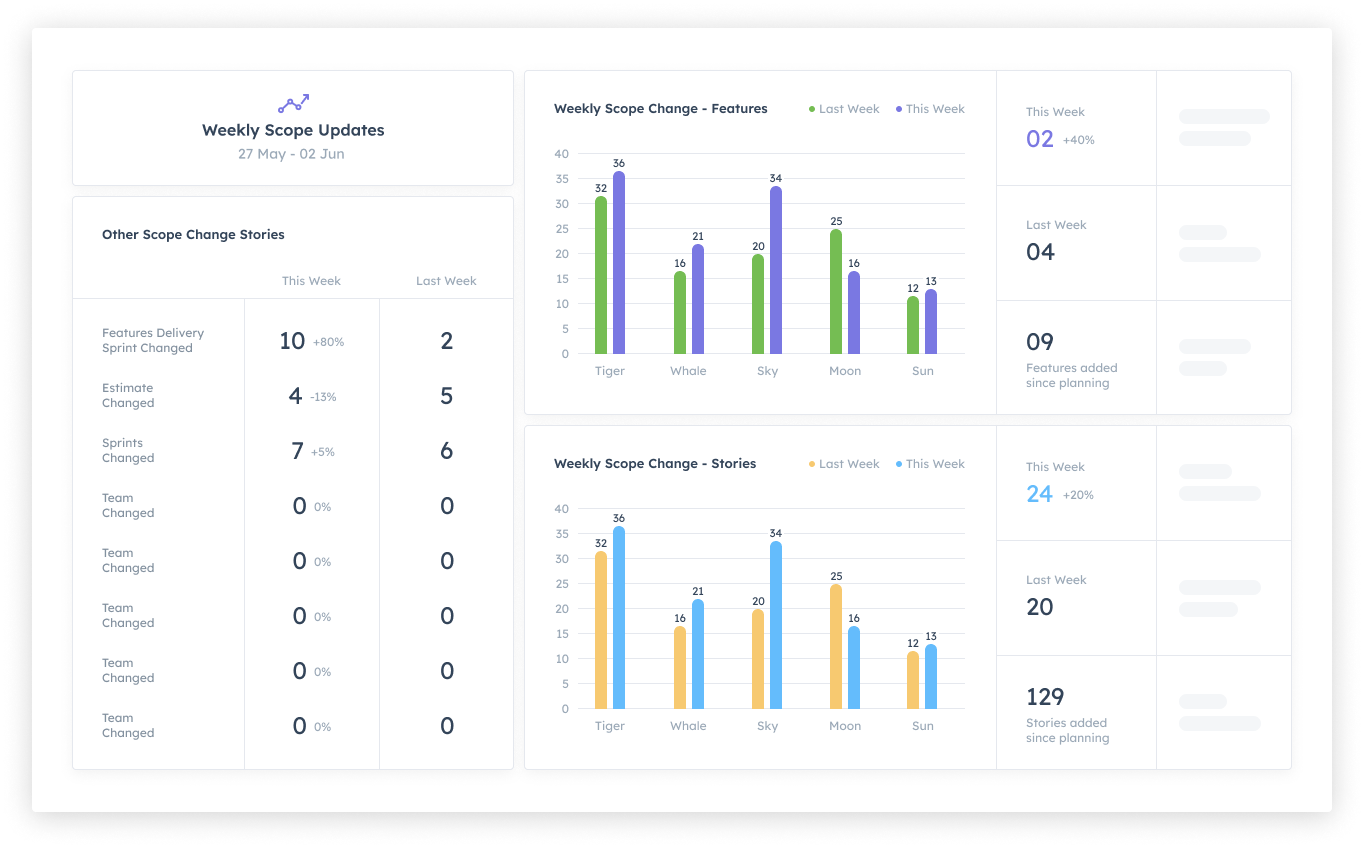
| Kendis | A planning snapshot when the board moves to Tracking, scope added and removed since planning per sprint, unplanned work, and start vs end of PI comparisons, across teams and trains. |
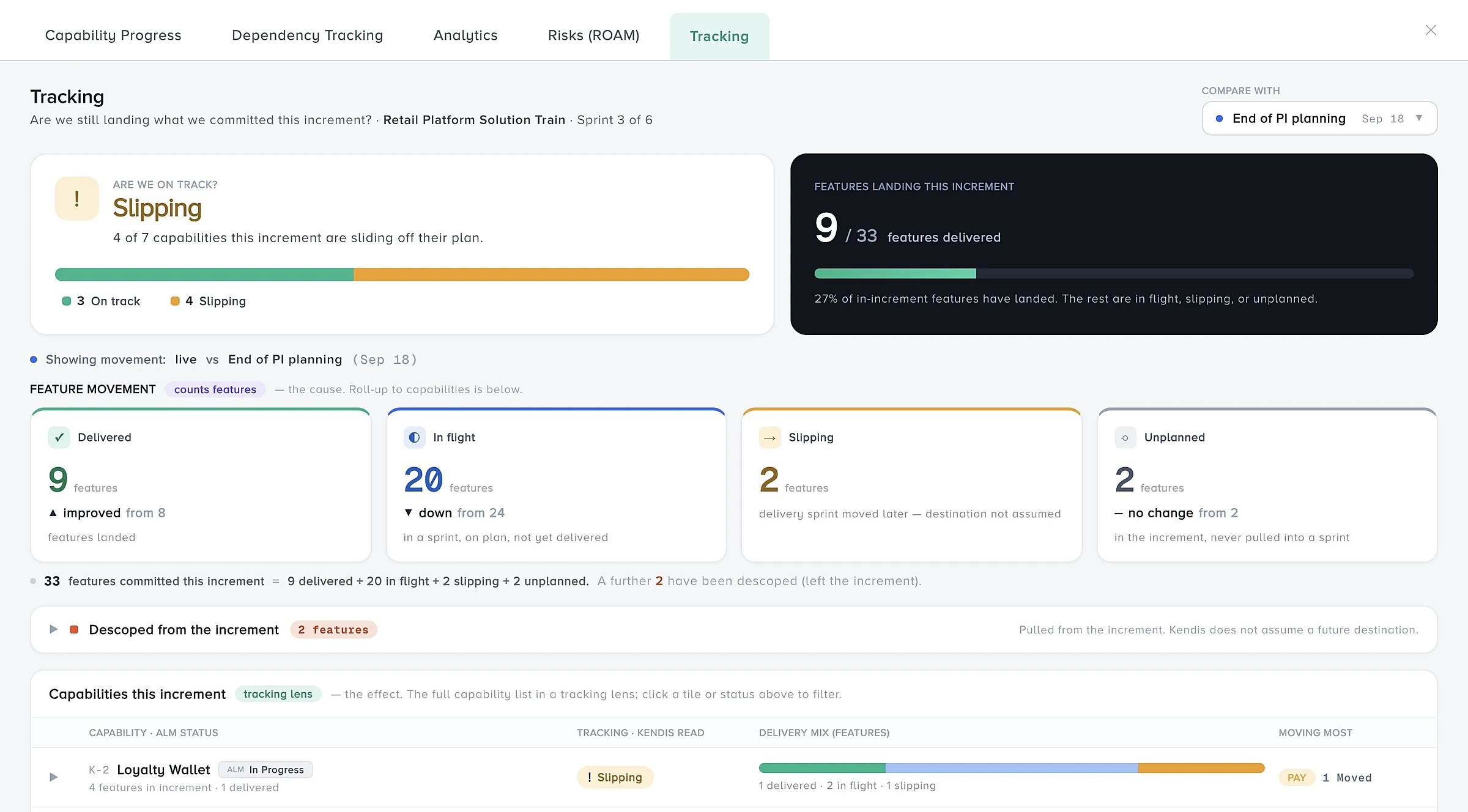
In Kendis, switching a PI board to Tracking captures a snapshot of the plan. Analytics shows story points added and removed since planning, per sprint, plus carry-over and unplanned work. On the solution board, the baseline is captured automatically when a linked PI board moves to Tracking, then a snapshot is taken at the end of every sprint and never overwritten. At the end of the PI, the End of Increment report compares committed features with final scope and shows how much unplanned work was absorbed.
Put this into practice, free for 6 months
Kendis is a PI Planning and tracking platform that sits on top of Jira and Azure DevOps. The free trial runs for six months, long enough to plan and track two full PIs with your real backlog before anyone has to approve a budget.
- 6 months free, no credit card
- Choose EU hosting (OVHcloud, Frankfurt) or US hosting (AWS)
- Planning board, dependencies, PI objectives, ROAM risks, solution boards
- Two-way sync with Jira Cloud, Jira Data Center and Azure DevOps
- ISO/IEC 27001 certified, GDPR compliant, DORA Schedule available
- No user caps and no setup costs during the trial
One trial per organisation that has not used Kendis in the last twelve months. After the trial, Premium Cloud is $14 per user per month billed annually, or $16 monthly, and you license only the people who plan. SSO, Kendis AI and premium support are part of paid plans. See pricing and the free trial terms.
Scope change and scope creep: frequently asked questions
What is a scope change?
A scope change is an agreed addition, removal or modification of planned work. In agile, it usually means features or stories added, removed or moved after sprint or PI planning.
What is the difference between scope change and scope creep?
A scope change is a deliberate, recorded decision with a known trade-off. Scope creep is the gradual, uncontrolled growth of scope that nobody explicitly approved.
What is scope management in agile?
Agile scope management fixes the time box and capacity and lets scope flex. Each change is assessed against the goal, decided by the Product Owner or Product Management, and measured against a baseline.
How do you manage scope creep in agile?
Route requests through the Product Owner or Product Management, test them against the Sprint Goal or PI objectives, swap rather than add, and record every change against the baseline.
Can scope change during a sprint?
Yes. The Scrum Guide allows scope to be clarified and renegotiated with the Product Owner as more is learned, as long as no change endangers the Sprint Goal.
How is scope change handled in SAFe?
The plan at the end of PI Planning is the baseline. Teams protect committed objectives, use uncommitted ones as a buffer, decide mid-PI changes in the ART Sync, and review them in Inspect and Adapt.
How do you measure scope change?
Compare current scope with the planning baseline: planned, added, removed and moved work. Kendis recommends a scope change ratio, (added + removed) / planned, and net scope growth, (added minus removed) / planned.
What is a good scope change ratio?
There is no standard benchmark. Track your own trend over several sprints or PIs, and investigate sudden increases, especially when predictability drops too.
Sources
Every external claim in this guide links to the primary source below. All links were checked on 14 October 2026.
- Wikipedia. Scope creep.
- Agile Alliance signatories. Principles behind the Agile Manifesto (2001).
- Wikipedia. Project management triangle.
- Wikipedia. Change control (quoting the Project Management Institute definition).
- Ken Schwaber and Jeff Sutherland. The Scrum Guide (November 2020).
- Scaled Agile, Inc. PI Objectives.
- Scaled Agile, Inc. PI Objectives (archived version, last updated 13 December 2022).
- Scaled Agile, Inc. PI Planning.
- Scaled Agile, Inc. ART Sync (last updated 20 March 2026).
- Scaled Agile, Inc. Inspect and Adapt.
- Scaled Agile, Inc. SAFe Glossary.
- Scaled Agile, Inc. Inspect and Adapt (archived version, last updated 22 January 2023).
- Atlassian Support. View and understand the Burnup chart or report.
- Atlassian Support. View and understand the sprint report.
- Microsoft Learn. Configure burndown and burnup widgets (Azure DevOps).
How this guide is maintained: definitions are checked against the framework pages and other primary sources listed above, and the guide is updated when terminology or guidance changes. Examples, checklists and practical advice are Kendis guidance and are not official SAFe material. SAFe and Scaled Agile Framework are registered trademarks of Scaled Agile, Inc.