
PI Planning tool for Jira
Jira is great at team level. For large programs, Program Increments and cross-team dependencies it needs help, and Confluence adds manual work. Kendis plans your PI on top of Jira, with no administrative effort.
- Jira Cloud, Data Center and Server
- Real-time, two-way sync
- Free for 6 months
Program management in Jira, with and without Kendis
Where Jira on its own falls short for a Program Increment, and how Kendis fills the gap.
| Jira on its own | Jira with Kendis | |
|---|---|---|
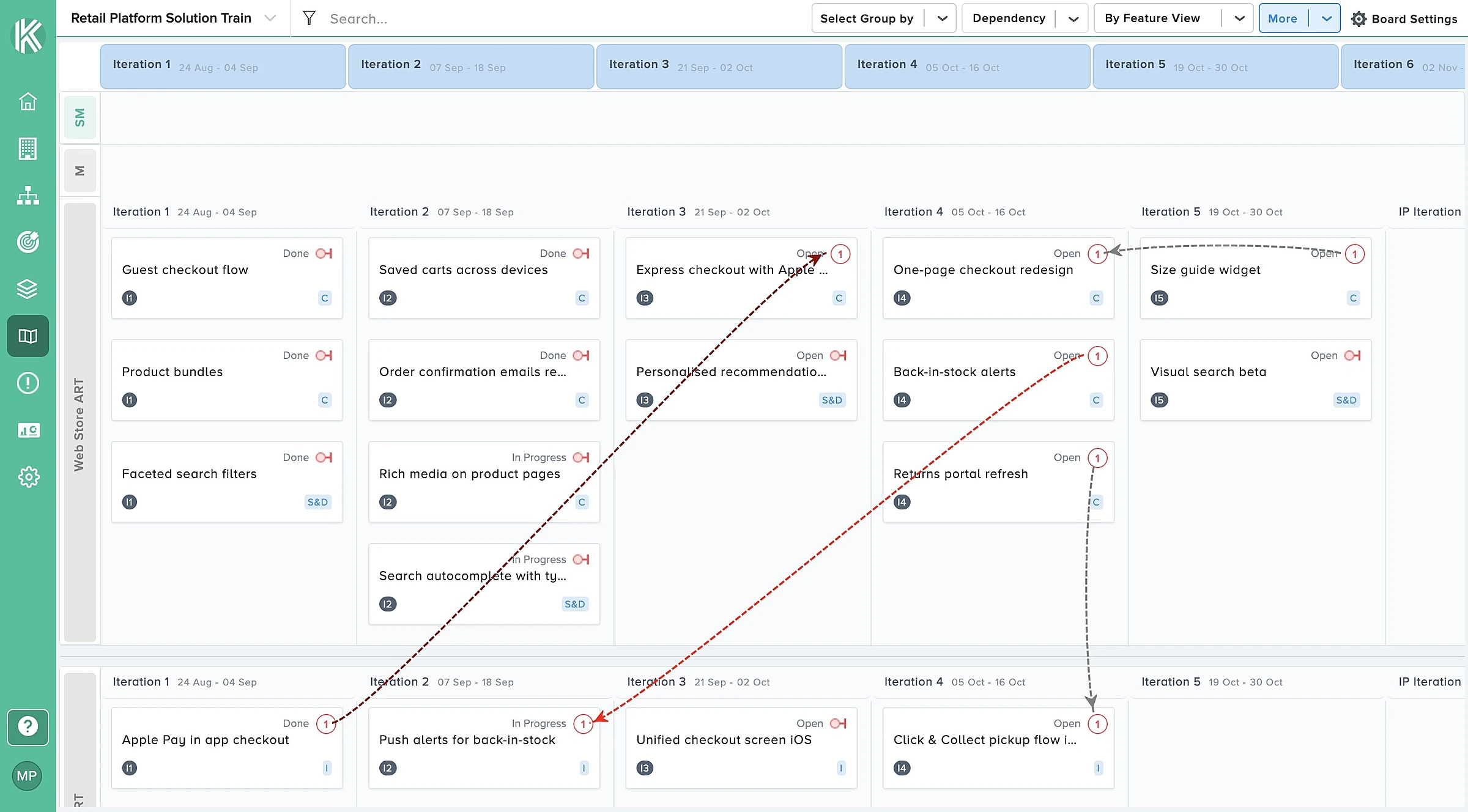
| Dependencies | No visual way to manage dependencies across teams | Draw dependencies on the board, each with its own status and link type |
| Cross-team features | Hard to manage features that several teams deliver | Team swimlanes make it clear which team owns which work |
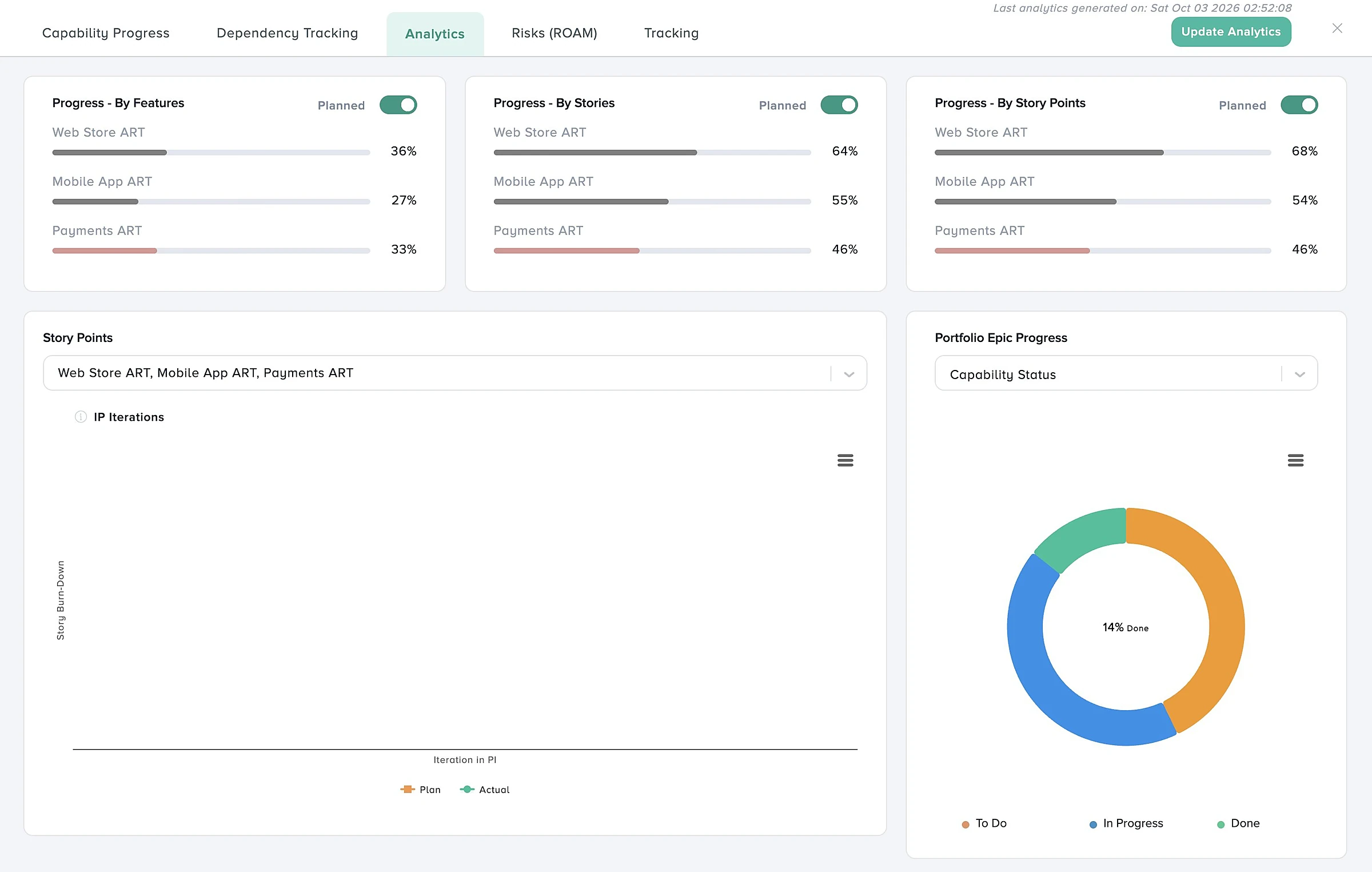
| Progress and scope change | No transparent tracking of progress or scope changes | Analytics, reports and scope change tracking against the plan |
| Overview | No bird's eye view of the whole Program Increment | Three viewing modes show the state of the board at a glance |
| Remote PI Planning | No way to plan in real time with remote team members | Plan collaboratively with remote teams on one live board |
| PI objectives | No automated way to plan and track objectives | Objectives with business value, linked to items on the board |
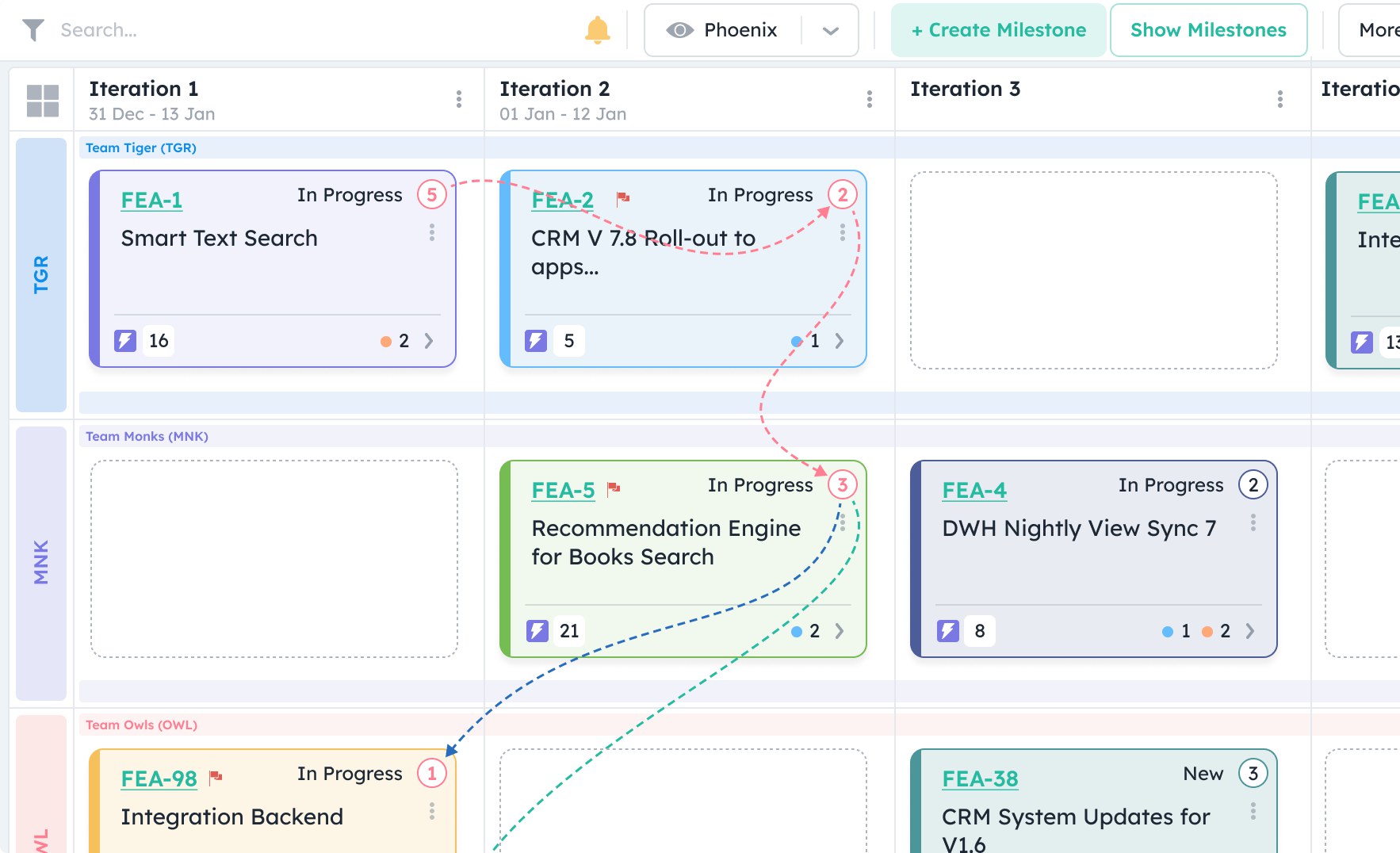
Customizable program boards
Map work items from Jira onto a Kendis program board that fits how your Agile Release Train works, without the manual effort of planning in Jira and Confluence.
- Teams, sprints and swimlanes set up the way you plan
- Epics, features and stories from Jira filters or JQL
- Colour badges per team
Real-time, two-way sync with Jira
Connect with the Kendis app from the Atlassian Marketplace or through the Jira API, and your work items sync to Kendis in seconds. Changes flow both ways through the Jira webhook.
- Jira Cloud, Jira Data Center and Jira Server
- Stories created in Jira as teams plan
- Dependencies synced as Jira issue links
Daily and weekly scope change reports
Bring data from several boards together with the filters you choose. Reports summarise what changed in a session in a table, so scope changes never go unnoticed.
- Filters across multiple boards
- Activity summarised per session
- Scope added and removed since planning
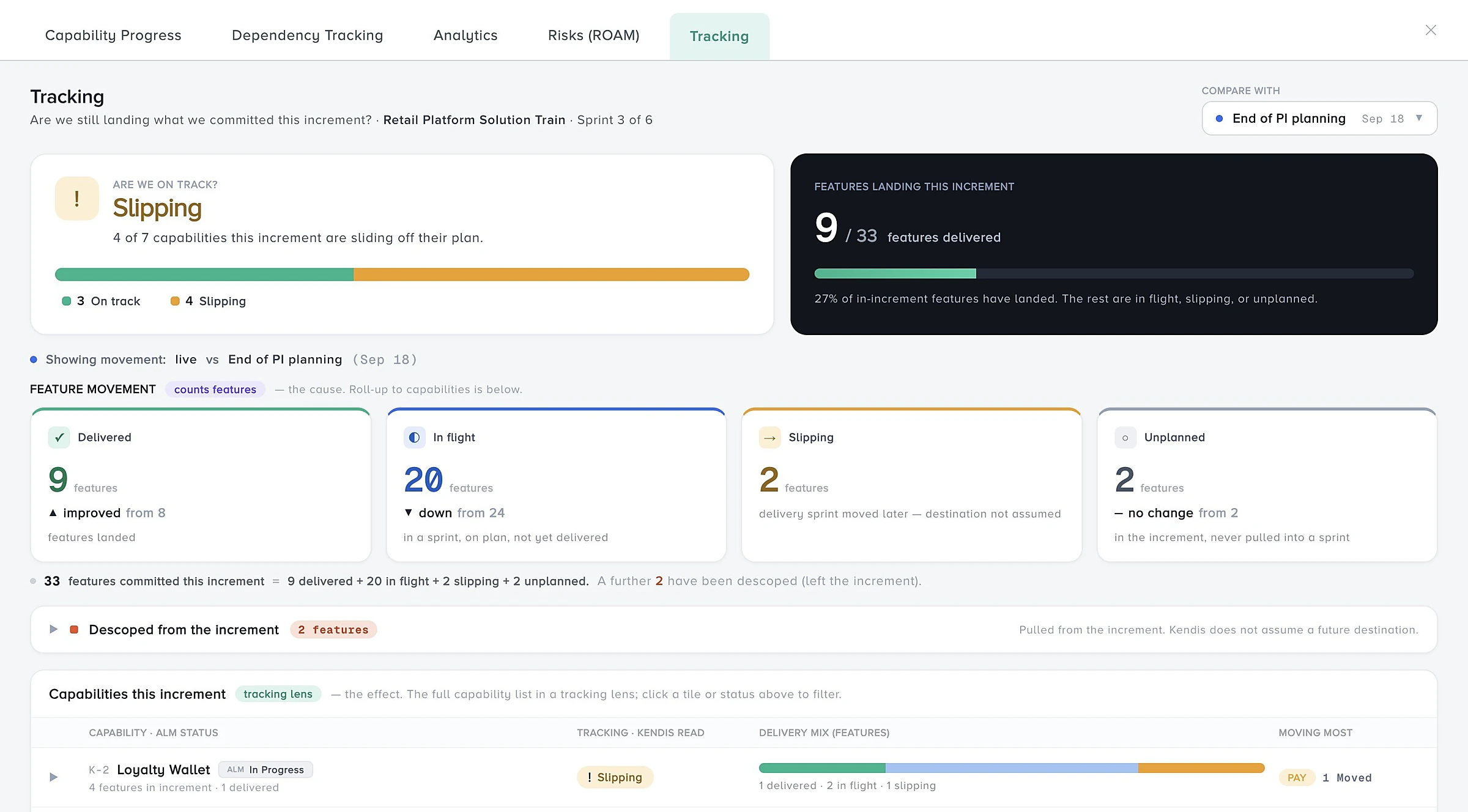
Pre and post PI Planning
Save the planning state of your PI as a reference while you execute it. With one click you can go back in time to see what was originally planned.
- A snapshot of the plan when PI Planning ends
- Compare execution with the original plan
- Go back to any earlier state
Everything you need for scaled agile on top of Jira
Program boards
Plan every team, sprint and feature on one live board, in the room or remote.
Learn moreDependencies
Map cross-team dependencies, give each a status and owner, and track them.
Learn moreROAM risks
Raise, ROAM and track the risks to your PI on a shared board.
Learn morePI objectives
Write team and program objectives with business value and link them to features.
Learn moreReports and analytics
See progress, scope change and delivery in charts and tables.
Learn moreWorks with every edition of Jira
Two-way sync with your Jira, wherever it runs.
Jira Cloud
Connect with an API token or the Kendis app from the Atlassian Marketplace.
See the integrationJira Data Center
Connect your self-managed Jira with OAuth through Application Links.
See the integrationJira Server
Keep planning on Jira Server while you plan your move to Cloud or Data Center.
See the integrationAI-assisted PI Planning in Jira: how Kendis AI helps
Kendis AI, called Charlie, works inside the planning flows you already use. It reads your real board data, so there is no prompt writing.
- ObjectivesGenerates clear, measurable PI Objectives from your planned features and stories, up to ten at a time.
- DependenciesDrafts the summary and description of a dependency from the feature, story, iteration and team involved.
- RisksDescribe a risk in plain language and it proposes a title, description, mitigation actions, probability and impact.
- ReportsBuilds an end of PI Planning report with a health score, dependency analysis and a risk summary.
Kendis AI is part of the ORG Views plan. You can switch ORG Views on for a 14-day trial at any time, including during the six-month free trial. See what Kendis AI does.
Run your next two PI Planning events in Jira, free
Kendis is a PI Planning and tracking platform that sits on top of Jira and Azure DevOps. The free trial runs for six months, long enough to plan and track two full PIs with your real backlog before anyone has to approve a budget.
One trial per organisation that has not used Kendis in the last twelve months. After the trial, Premium Cloud is $14 per user per month billed annually, or $16 monthly, and you license only the people who plan. See pricing and the free trial terms.
- 6 months free, no credit card
- Choose EU hosting (OVHcloud, Frankfurt) or US hosting (AWS)
- Two-way sync with Jira Cloud, Jira Data Center and Azure DevOps
- Planning board, dependencies, PI objectives, ROAM risks, solution boards
- ISO/IEC 27001 certified, GDPR compliant, DORA Schedule available
- No user caps and no setup costs during the trial
Frequently asked questions
What teams ask before they plan PI Planning in Jira with Kendis.
Jira works well at team level, but on its own it has no visual way to manage cross-team dependencies, plan with remote teams in real time or track PI objectives. Teams often add Confluence, which means manual work. Kendis adds that planning layer on top of Jira.
No. Epics, features, stories, sprints and dependency links stay in Jira. Kendis adds the program board and syncs every change both ways.
Jira Cloud, Jira Data Center and Jira Server. See the setup for each on the integration pages.
Install the Kendis app from the Atlassian Marketplace, or connect through the Jira API with your Jira URL and an API token. A Jira webhook keeps changes in sync in real time.
Yes. Kendis is free for six months with no credit card, long enough to plan and track two full PIs with your real Jira backlog.