Remote PI Planning Tool for Distributed and Hybrid Teams
Kendis is a remote PI Planning tool that lets every team on an Agile Release Train plan the same Program Increment on one live program board, whether they are remote, distributed across offices or in the room. Features, dependencies, PI objectives, risks and the confidence vote stay in sync with Jira and Azure DevOps.
- Remote, hybrid or in the room
- Two-way sync with Jira and Azure DevOps
- Free for 6 months
The three challenges of remote PI Planning
What breaks first when an Agile Release Train plans across locations, and how one shared board fixes it.
Collaboration across locations
Teams in different places plan on one live board instead of photos of sticky notes and shared spreadsheets.
Transparency and alignment
Objectives, dependencies and risks are visible to everyone on the train, in real time, throughout the PI.
Faster decisions
The management review sees the whole plan, the dependencies and the confidence vote in one place, so trade-offs are made on the day.
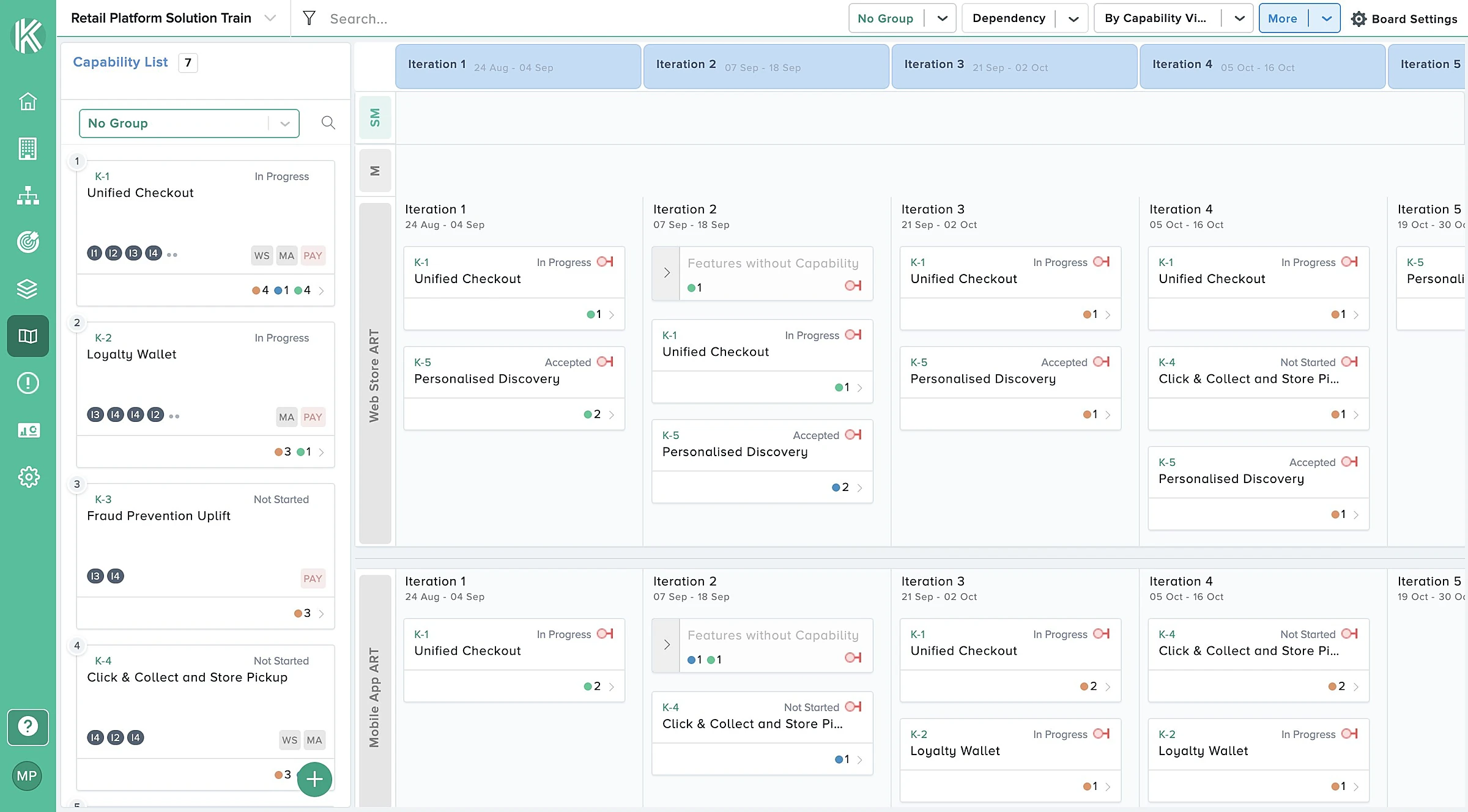
One live program board for every team
Every team on the Agile Release Train plans on the same board at the same time, whether they sit in one room, several offices or at home. Changes appear for everyone instantly, so nothing is lost between locations.
- Team swimlanes with sprints and capacity
- Features pulled from the prioritized program backlog
- Stories created in Jira or Azure DevOps as teams plan
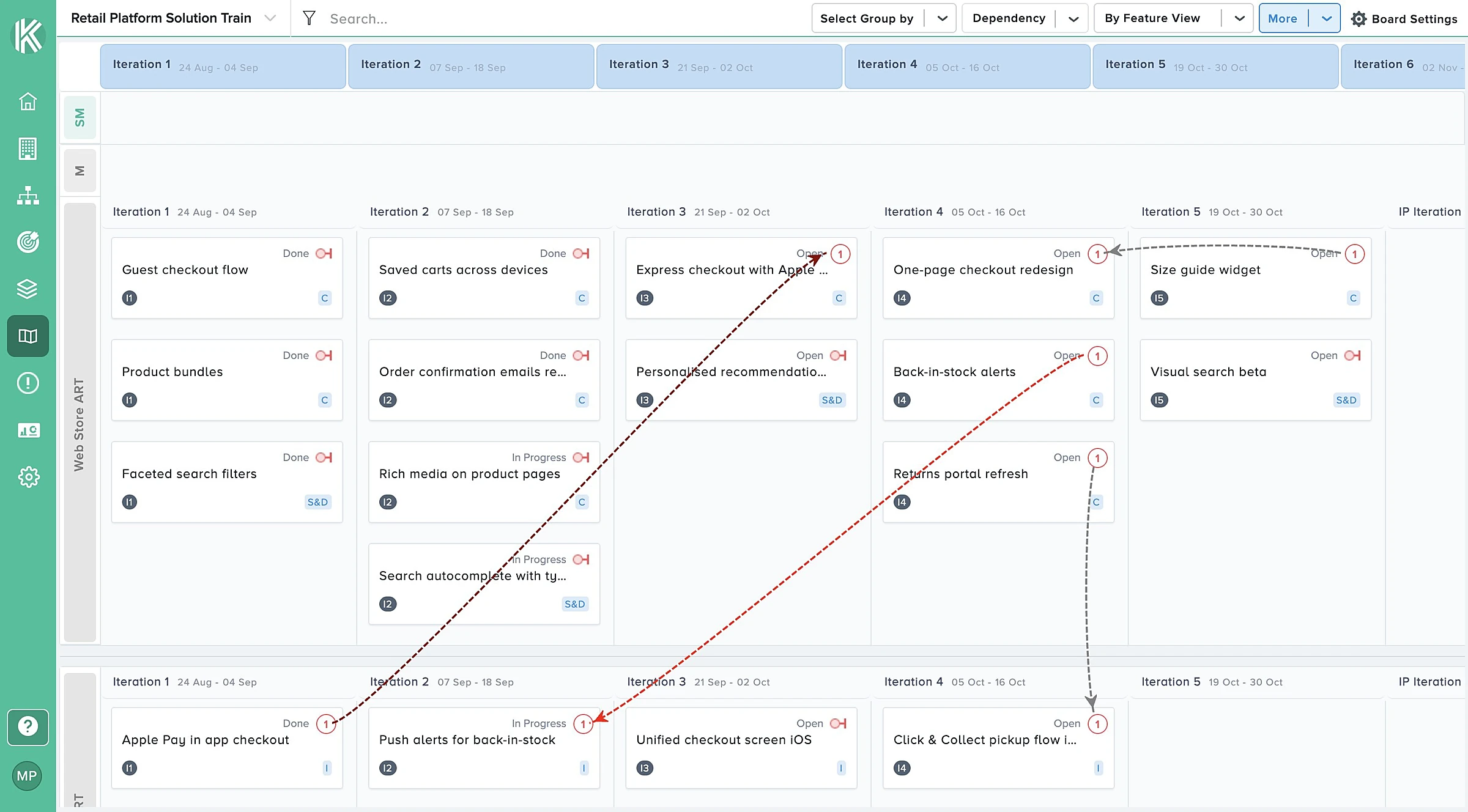
Cross-team dependencies everyone can see
Draw a dependency between two teams on the board and both sides see it straight away. Each one is colour-coded, has a status and syncs to your ALM tool as an issue link.
- Created, planned and tracked on the board
- Colour-coded and updated automatically
- Synced to Jira and Azure DevOps
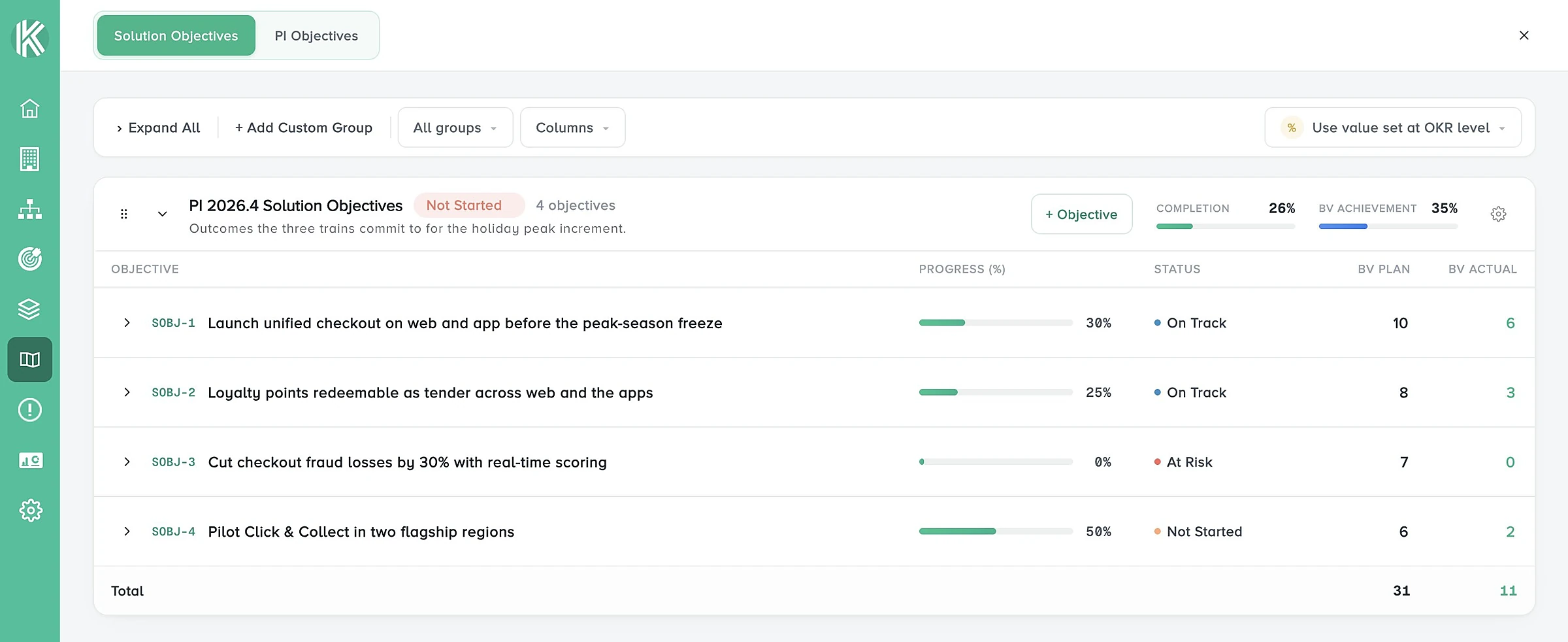
PI objectives and a remote confidence vote
Teams write their PI objectives on the board and link them to features. At the end of planning, run the confidence vote online for the whole train or for selected teams.
- Team and program PI objectives with business value
- Confidence vote for the whole train or selected teams
- People without a Kendis account can vote through a secure link
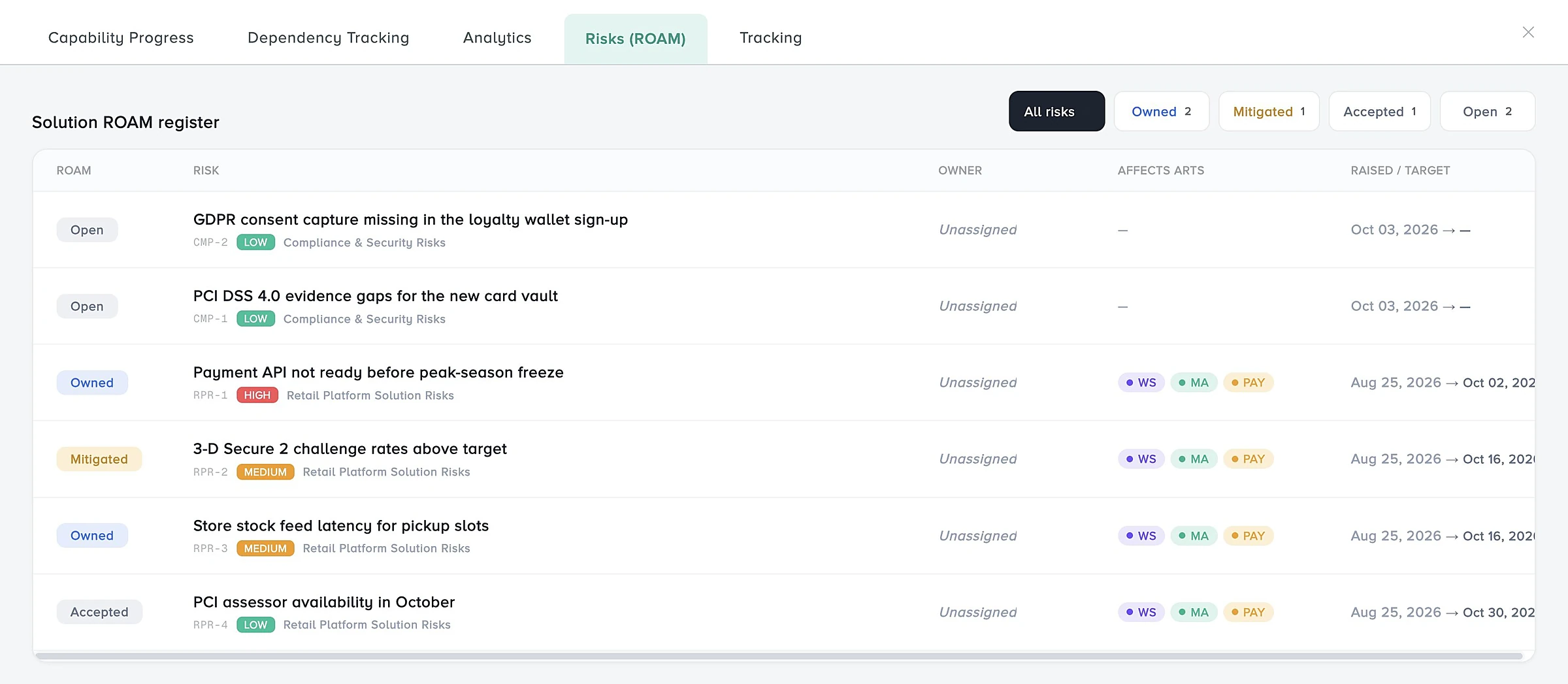
ROAM risks in one shared register
Raise risks during the breakouts and ROAM them together in the management review. The risk register and risk matrix show the severity of each risk to every location.
- Risk register and risk matrix
- Resolved, Owned, Accepted or Mitigated
- Risks linked to the work they affect
Track the PI after planning
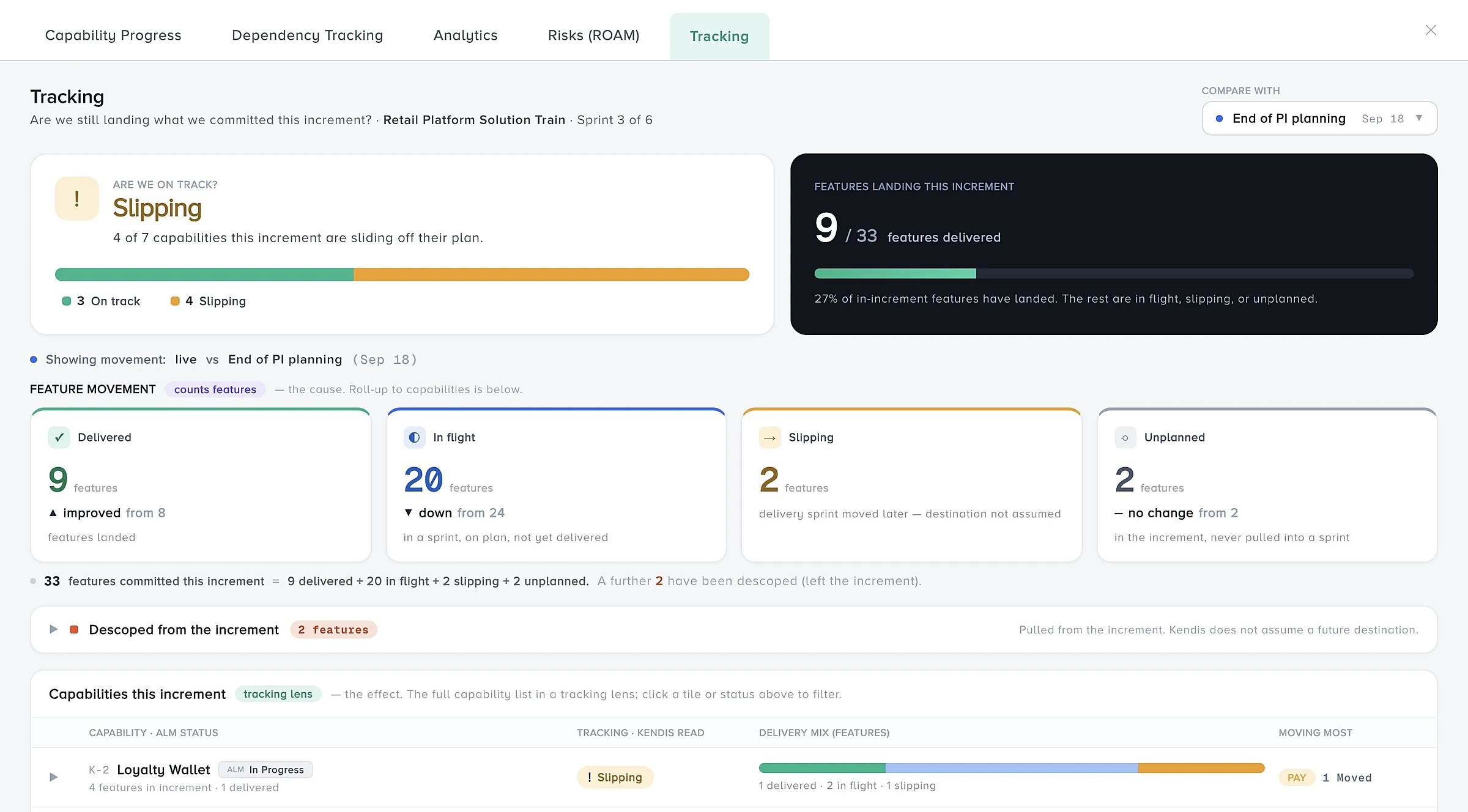
Switch the board to tracking when planning ends. Follow objectives, dependencies, risks, features and scope changes against the plan, and keep Scrum of Scrums on the same board.
- Snapshot of the plan at the end of PI Planning
- Scope change tracking against the plan
- Scrum of Scrums impediments and changes in one place
How to run remote PI Planning in Kendis
Six steps from preparation to tracking, for remote, hybrid or co-located events.
Prepare the backlog
Refine and rank features before the event, with WSJF if you use it, and set each team's capacity per sprint.
Share context and the agenda
Publish the vision, business context and agenda so every location starts from the same information.
Plan in team breakouts
Teams place features and stories in sprints on the shared board, each from wherever they work.
Agree dependencies and risks
Draw cross-team dependencies and raise risks on the board, then ROAM the risks together.
Commit with objectives and a vote
Write PI objectives with business value and run the confidence vote online.
Track the PI
Snapshot the plan and follow progress, dependencies and scope change until the next PI.
Everything you need to plan and track a PI
Program boards
Plan every team, sprint and feature on one live board, in the room or remote.
Learn moreDependencies
Map cross-team dependencies, give each a status and owner, and track them.
Learn moreROAM risks
Raise, ROAM and track the risks to your PI on a shared board.
Learn morePI objectives
Write team and program objectives with business value and link them to features.
Learn moreReports and analytics
See progress, scope change and delivery in charts and tables.
Learn moreAI-assisted distributed PI Planning: how Kendis AI helps
Kendis AI, called Charlie, works inside the planning flows you already use. It reads your real board data, so there is no prompt writing.
- ObjectivesGenerates clear, measurable PI Objectives from your planned features and stories, up to ten at a time.
- DependenciesDrafts the summary and description of a dependency from the feature, story, iteration and team involved.
- RisksDescribe a risk in plain language and it proposes a title, description, mitigation actions, probability and impact.
- ReportsBuilds an end of PI Planning report with a health score, dependency analysis and a risk summary.
Kendis AI is part of the ORG Views plan. You can switch ORG Views on for a 14-day trial at any time, including during the six-month free trial. See what Kendis AI does.
Run your next remote PI Planning free
Kendis is a PI Planning and tracking platform that sits on top of Jira and Azure DevOps. The free trial runs for six months, long enough to plan and track two full PIs with your real backlog before anyone has to approve a budget.
One trial per organisation that has not used Kendis in the last twelve months. After the trial, Premium Cloud is $14 per user per month billed annually, or $16 monthly, and you license only the people who plan. See pricing and the free trial terms.
- 6 months free, no credit card
- Choose EU hosting (OVHcloud, Frankfurt) or US hosting (AWS)
- Two-way sync with Jira Cloud, Jira Data Center and Azure DevOps
- Planning board, dependencies, PI objectives, ROAM risks, solution boards
- ISO/IEC 27001 certified, GDPR compliant, DORA Schedule available
- No user caps and no setup costs during the trial
Frequently asked questions
What teams ask before they run remote PI Planning in Kendis.
Remote PI Planning, also called distributed or virtual PI Planning, is PI Planning where the teams of an Agile Release Train are not all in one room. Some or all of them join remotely, from other offices or time zones, and plan the Program Increment together on a shared digital program board instead of a physical wall.
Yes. Kendis works for fully remote, hybrid and co-located PI Planning. Everyone works on the same live program board, so a team in the room and a team at home see the same plan at the same moment.
Run the vote in Kendis for the whole release train or for selected teams. People in your organisation who do not have a Kendis account can take part through a unique, secure link.
Yes. Features, stories, sprints and dependency links stay in Jira or Azure DevOps. Kendis adds the program board on top and syncs changes both ways, and stories are created in your ALM tool as teams plan.
Yes. When planning ends, switch the board to tracking to snapshot the plan, then follow PI objectives, dependencies, risks, features and scope changes against it.
Yes. Kendis is free for six months with no credit card, long enough to plan and track two full PIs with your real backlog.